What Is the Blossom Word Game Helper?
The Blossom Word Game helper is a concise web-based support resource for players who are stuck or seeking strategy during a session.. Unlike a full solver, it provides targeted help to get you moving again without taking over the session.
Think of a helper as a knowledgeable friend who plays Blossom daily. They do not solve the puzzle for you; they give the right nudge at the right moment so you can keep solving..
How the Helper Works
The helper approach is layered. Start with the lightest level of support. If you’re still stuck, go one level deeper. Stop as soon as you’re moving again to preserve learning gains and the satisfaction of solving independently..
Level 1 — Strategy Reminder
Before looking for specific words, apply the most commonly missed technique. For every valid word you have already found, immediately test:
- Adding -S (plurals, third-person verb forms)
- Adding -ED (past tense)
- Adding -ER (agent noun: someone who does the action)
- Adding -ERS (plural of -ER form)
- Adding -ING (gerund / present participle)
This single habit adds three to six words to most sessions. Players who skip it leave their easiest points behind.
Level 2 — Word Count Check
If you’ve extended all your found words and are still stuck, check the daily answers page for the word count only. Knowing there are twelve four-letter words when you’ve found seven tells you exactly how much is left to find at that length.
Level 3 — Targeted Hints
The hints page gives you category clues and pangram guidance without revealing actual words. Use this when word counts are not enough but you’re not ready for the full answer list.
Level 4 — Full Word List
When you’ve genuinely exhausted your ideas, the daily answers page shows the complete word list. Use the list as a learning tool – look up every word you didn’t find and understand why it qualifies.
Specific Help by Problem Type
“I Cannot Find Any Four-Letter Words”
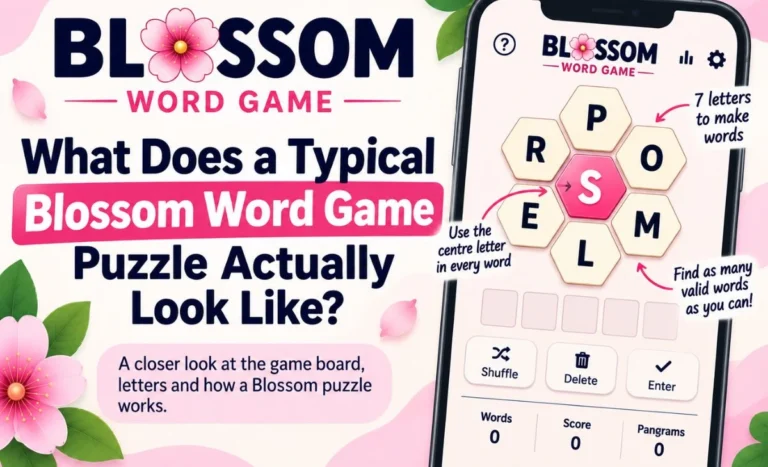
Try this approach: take the center letter and think about what it commonly follows. If the center letter is L, think about words where L is the second, third, or fourth letter, not just the first. Center letters appear anywhere in a valid word — not exclusively at the start.
Then try common four-letter word templates:
- _A_E (BALE, CAME, FAME, LANE, RATE, TALE)
- _OLD (BOLD, COLD, FOLD, GOLD, HOLD, MOLD)
- _ING (RING, SING, KING, WING, BING, DING)
Substitute your available letters into these patterns and check which combinations form real words.
“I Have Found Short Words but Nothing Longer”
Take your four-letter words and extend them systematically. For each one:
- Can it become a five-letter word? (BLOOM → BLOOMS, BALER → add -S, BAKER → remove -ER, add -ING → BAKING)
- Can it take a prefix? (FOLD → UNFOLD, LOCK → UNLOCK, LOAD → RELOAD)
Most six-letter words in Blossom are extensions of four or five-letter words rather than independent finds.
“I Cannot Find the Pangram”
Three reliable approaches:
Vowel anchor: Write the vowels in your puzzle. Think about seven-letter words that contain exactly those vowels. Check whether the consonants can fill the remaining positions.
Suffix sweep: Take the center letter and try it in combination with the most common seven-letter endings: -TION, -MENT, -NESS, -LING, -STER, -ING (from a five-letter base).
Paper rearrangement: Write the seven letters in a straight line in a different order from the honeycomb. The visual rearrangement often makes the pangram visible when the grid layout has created a mental block.
If none of these surface the pangram after ten minutes of dedicated hunting, it may not exist today. Not every puzzle has one.
Quick Helper Checklist
Use this during your session whenever you feel stuck:
| Stuck Point | Action |
| No new words appearing | Extend every found word with -S, -ED, -ER, -ING |
| Only short words found | Test prefixes: UN-, RE-, OUT-, PRE- |
| No six-letter words | Add -ERS to every -ER word you found |
| Cannot find the pangram | Write letters in a new order on paper |
| Exhausted all ideas | Check the hints page for category clues |
| Ready for full answers | Visit the daily answers page |
Frequently Asked Questions
Is there a built-in helper in the Blossom Word Game?
No. Blossom Word Game does not include a hint system or helper feature. All external help comes from third-party sources.
How do I get help without seeing the answers?
Use the hints page, which gives word counts and category clues without revealing actual words. Work through the helper checklist before checking any external resource.
What if the helper techniques do not work?
If systematic extension, prefix testing, and pangram hunting have all been exhausted without finding new words, the simplest explanation is that you have found most of what is available. Check the answers page to confirm — some days have shorter word lists than others.
Final Thoughts
A good helper doesn’t solve the puzzle for you. It gets you back into a position where you can solve it yourself.
The layered system is designed to give you the smallest nudge needed to move forward. The goal is never to hand over the answer. It is to restore momentum when the session has stalled.
The players who improve fastest use helpers carefully. They try the strategy reminder before anything else. They move to hints only when the strategy fails. They check the full answers only when everything else has been exhausted. And when they do check the answers, they treat every missed word as a lesson rather than a score to retroactively inflate.
That approach turns a helper into a genuine learning tool. Use it that way and tomorrow’s session will be better than today’s.